 Export My Requests for Jira Service Management
Documentation
Export My Requests for Jira Service Management adds Export my requests to the user menu of the Jira Service Management customer portal.
Getting started
- A Jira admin installs the app from the Atlassian Marketplace. Nothing else is required: default columns are ready.
- Customers sign in to the portal, click their avatar (top right) and choose Export my requests.
- Optional: a Jira admin opens Settings → Apps → Manage apps → Export My Requests → Configure to choose columns, formats, the CSV separator and the date format.
For customers
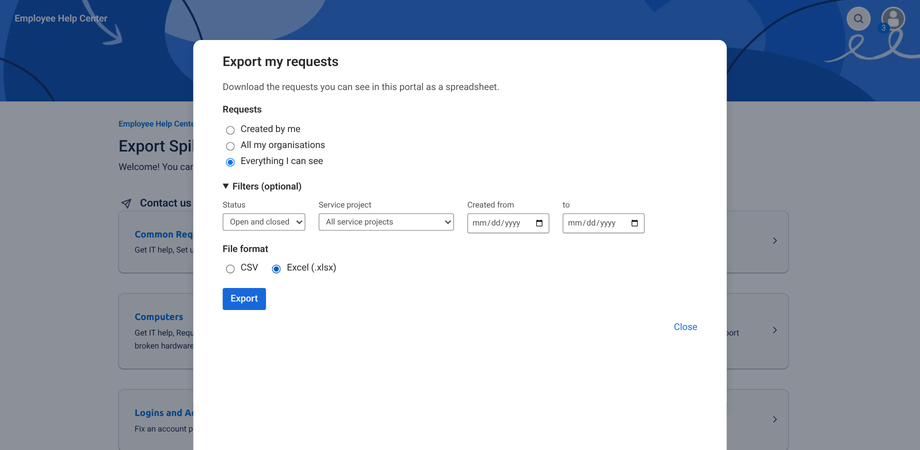
- Requests: Created by me, All my organisations (or one organisation if you belong to several), or Everything I can see (your requests, those you participate in and those shared with your organisations).
- Filters (optional): open or closed, service project, created date range.
- Format: CSV or Excel (.xlsx). After an export you can download the same data again, or in the other format, without reloading.
- Large exports show a progress counter and can be cancelled. The service desk may set a maximum number of requests per export.
- Dates use your time zone. In Excel files they are real dates you can sort and filter.
For admins
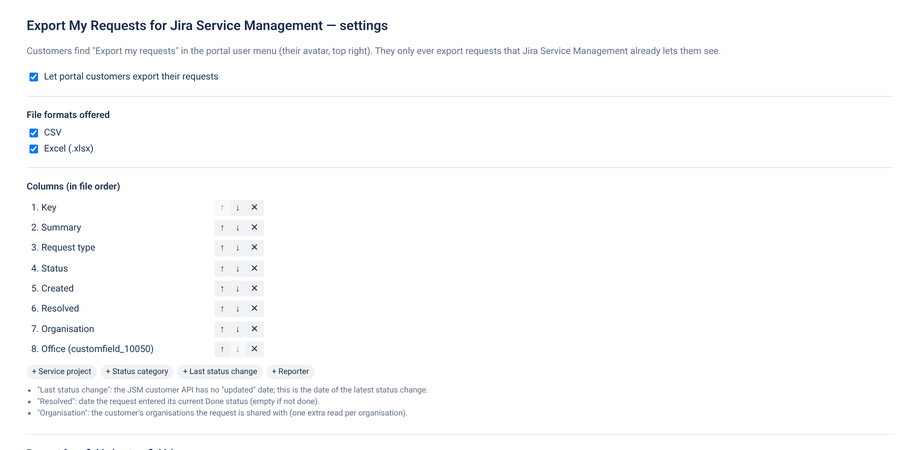
- Enable or disable the export for customers.
- Formats: CSV, Excel, or both.
- Columns (in file order): Key, Summary, Request type, Service project, Status, Status category, Created, Last status change, Resolved, Reporter, Organisation, and request form fields (custom fields). Click Find fields in request types to list the fields of your request types, or add a field by id (e.g.
customfield_10050). Only fields visible to customers on the request form can be exported. - CSV separator: Automatic (semicolon when the customer's language uses a decimal comma — French, German, Spanish… — comma otherwise), comma, semicolon or tab. CSV files are UTF-8 with a BOM so Excel shows accents correctly.
- Date format: ISO 8601, YYYY-MM-DD HH:mm, DD/MM/YYYY HH:mm, MM/DD/YYYY HH:mm, or date only.
- Service projects: all, or a selection.
- Maximum requests per export: 1,000 to 100,000 (default 50,000).
About some columns
- The JSM customer API has no "updated" date: Last status change is the date of the latest status change, as shown in the portal.
- Resolved is the date the request entered its current Done status (empty if it is not done).
- Organisation lists the customer's organisations the request is shared with. It is empty in the Created by me scope.
Permissions and security
Every request is read as the customer, so customers only export what Jira Service Management already shows them. The file is built in the browser; nothing is sent outside Atlassian and the app stores no personal data. Atlassian accounts without customer access to the portal see a message instead of the export. Without an active subscription, customers see a message asking them to contact the service desk team.
Uninstalling
Uninstalling deletes the app's settings. Nothing else is stored. See the privacy policy.
Release notes
2.3.0 (3 November 2026) — If the browser cannot reach Jira Service Management directly (network, proxy), the same read-only request is made as the same user from the app's Forge function; clearer error messages; accessibility improvements.
2.2.0 (3 November 2026) — “Everything I can see” includes requests you approve; agents and admins see only their own organisations; hint when there is nothing to export.
1.0.0 — First Marketplace release: customer portal export to CSV and Excel, scopes and filters, admin settings, English and French.